Steps to Create a Hierarchy
Typically, there are several steps to construct a hierarchy.
-
Create hierarchy structure
Create the shape of one hierarchy, which is composed of several levels of org unit type, such as country, province, lease, company, plant.
-
Organize hierarchy instance
Each level should have an org unit instance. For example, for the country level, it might be USA, China.
-
Assign Field/Facility/Well asset to each level of org unit
Once the hierarchy levels are completed, need to assign the field/facility/well to any level of the hierarchy.
-
Version management
Once we assign a new entity to one hierarchy level or change the existing entity to another level, the inputted effective date and expiry date can help to manage the version.
-
Hierarchy Template
Hierarchy template is not mandatory. Hierarchy template is used to facilitate the hierarchy structure creation. The template can be shared with users, and new template can be generated as new share.
Below is an example to illuminate how to create hierarchy levels by using a template.
There is an existing hierarchy template1. User can create a new hierarchy based on this existing template1 instead of start from zero.
Furthermore, user can add new node ``Sub Oil Plant'' as a new level for example and save it as a new Template2 as below. The template can be reused by other users if they hope to.
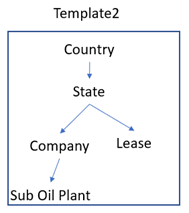 Figure 1. Template2