Export the read data to excel
Export feature extends the ability of exporting the data to excel based on the Common API reading data.
User can leverage and combine the multiple query criteria to filter out any kind of data as needed, the main query conditions including: specified select list, criteria filters, pagination, sorting, aggregation, having filters, simple join, dynamic join etc.
The main difference is : Common API is sending response in json, but Export API is sending response in excel,and it can export up to 50000 records.
- Note
-
If you want to export records more than 10000 then the records per page in pagination should be in multiple of 10000. For example 20000, 30000 etc.*
4. Request body
Export API following Common API’s parameters, And the usage is the same.
On this basis, a parameter is added.
| Name | Type | Required | Description |
|---|---|---|---|
isUploadNeeded |
bool |
no |
if selectList or aggregateSelectList is provided then only those columns will be exported. else: |
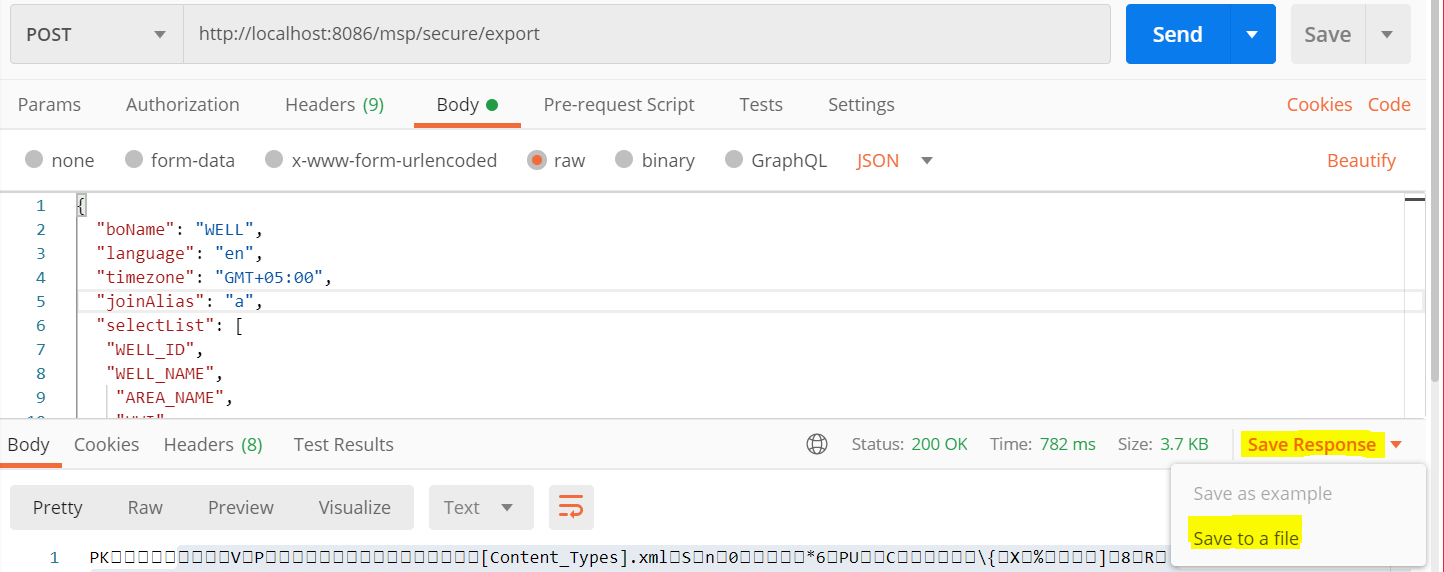
4.1 Example
{
  "boName": "WELL",
  "language": "en",
  "timezone": "GMT+05:00",
  "joinAlias": "a",
  "selectList": [
    "WELL_ID",
    "WELL_NAME",
    "AREA_NAME",
    "UWI"
  ],
   "criteriaFilters":[
      {
         "boAttrName":"WELL_TYPE",
         "operator":"EQUALS",
         "values":[
            "OIL"
         ]
      }
  ],
   "pagination":{
      "recordsPerPage":30,
      "pages":[
         1
      ]
   },
  "aggregateSelectList":[
      {
         "boAttrName":"WELL_ID",
         "aggregateFunction":"MAX",
         "alias":"MAX_WELL_ID"
      },
      {
         "boAttrName":"WELL_ID",
         "aggregateFunction":"MIN",
         "alias":"MIN_WELL_ID"
      }
   ],
  "havingFilters":[
      {
         "aggregateColumn":{
            "boAttrName":"ROW_CREATED_DATE",
            "aggregateFunction":"MAX"
         },
         "operator":"LESS_THAN",
         "values":[
            "2019-01-01 00:00:00+05:00"
         ]
      }
   ],
  "simpleJoins": [
    {
      "boName": "WELLBORE",
      "joinType": "INNER",
      "joinAlias": "b",
      "selectList": [
        "WELLBORE_ID",
        "WELLBORE_NAME"
      ],
      "joiningConditions": [
        {
          "leftSide": {
            "joinAlias": "a",
            "boAttrName": "UWI"
          },
          "operator": "EQUALS",
          "rightSide": {
            "joinAlias": "b",
            "boAttrName": "WELL_UWI"
          }
        }
      ]
    }
  ],
   "dynamicJoins":[
      {
         "selectList":[
            "UWI",
            "max_volume_date"
         ],
         "joinType":"INNER",
         "joinAlias":"c",
         "dynamicTables":[
            {
               "boName":"well vol daily",
               "selectList":[
                  "UWI"
               ],
               "aggregateSelectList":[
                  {
                     "boAttrName":"volume_date",
                     "aggregateFunction":"MAX",
                     "alias":"max_volume_date"
                  }
               ]
            }
         ],
         "joiningConditions":[
            {
               "leftSide":{
                  "joinAlias":"a",
                  "boAttrName":"UWI"
               },
               "operator":"EQUALS",
               "rightSide":{
                  "joinAlias":"c",
                  "boAttrName":"UWI"
               }
            }
         ],
         "orderBy":[
            {
               "boAttrName":"UWI",
               "order":"DESC"
            }
         ]
      }
   ],
   "orderBy": [
    {
      "boAttrName": "UWI",
      "order": "ASC"
    },
    {
      "boAttrName": "WELL_NAME",
      "order": "DESC"
    }
  ],
  "prependAlias": false,
  "showSQLStats":true
}
Try simpleJoins export myself
Try dynamicJoins export myself
4.2 How to save response?
On the typescript
import { saveAs } from 'file-saver';
var fileName = "exportName.xlsx";
saveBlob(responseData, fileName) {
    var excelBlob = new Blob([responseData], { type: 'application/octet-stream' });
    saveAs(excelBlob, fileName);
}
On the javascript
var fileName = "exportName.xlsx";

function saveBlob(responseData, fileName) {
   var excelBlob = new Blob([responseData], { type: 'application/octet-stream' });
   if (isIE()) {
      window.navigator.msSaveOrOpenBlob(excelBlob, fileName);
   } else {
       var a = document.getElementById("exportbtn");
       a.href = URL.createObjectURL(excelBlob);
       a.download = fileName;
       a.click();
       a.href = "";
   }
}

function isIE() {
    if (!!window.ActiveXObject || "ActiveXObject" in window) {
        return true;
    } else {
        return false;
    }
}
5. Responses
When response.status = 200, It will response a `application/octet-stream' excel file.
Otherwise, it will response json file, Please see Responses